Platform

One construction management platform for site and office

SuperWise is a construction management platform that holds a project's schedule, site progress, purchases, measurements and bills together. Set up company masters once, then run every project from the web or the phone.

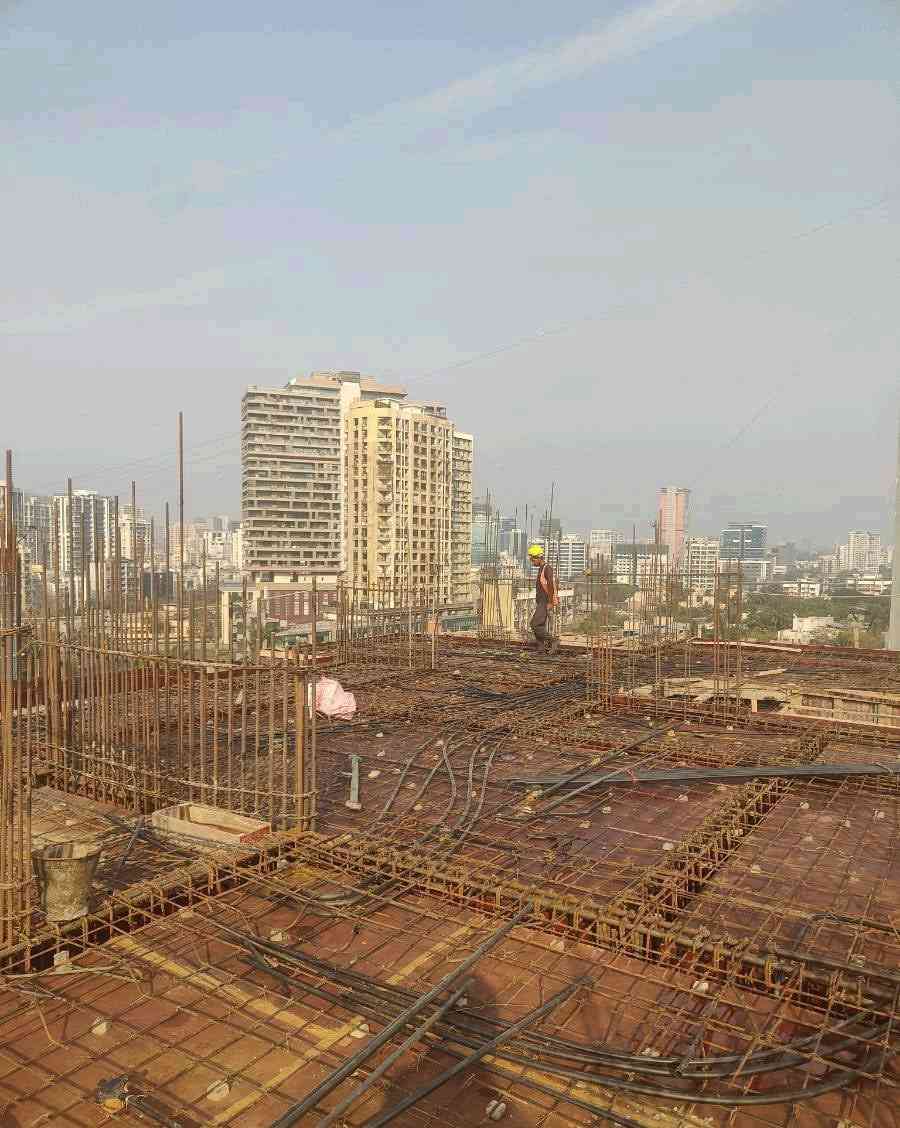
A worker in a yellow helmet walking across a slab reinforcement deck at height, with a tall apartment tower and the city skyline in the haze
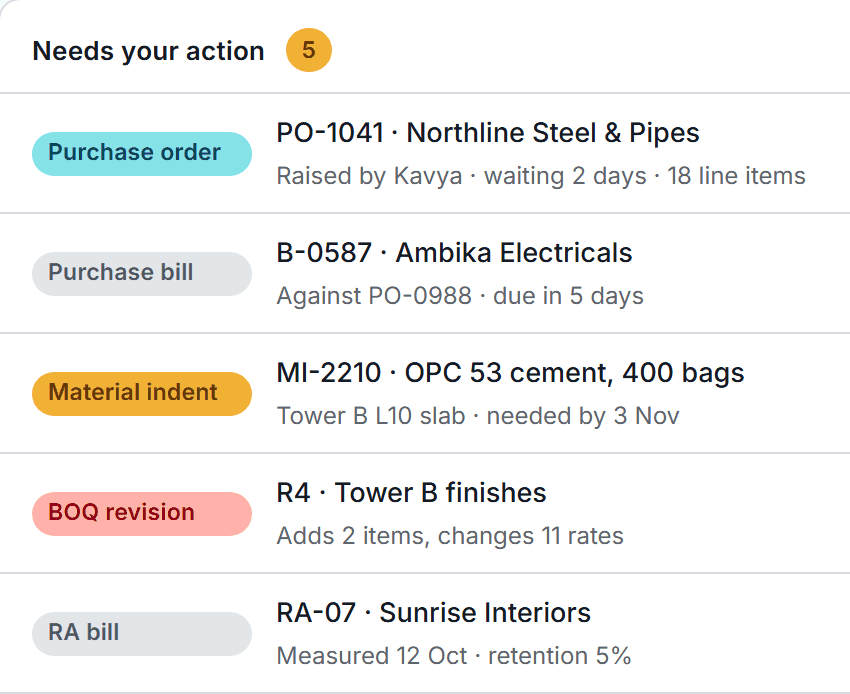
The portal dashboard's approval queue headed Needs your action with five items waiting: a purchase order for Northline Steel and Pipes, a purchase bill, a material indent for 400 bags of cement, a BOQ revision and an RA bill.
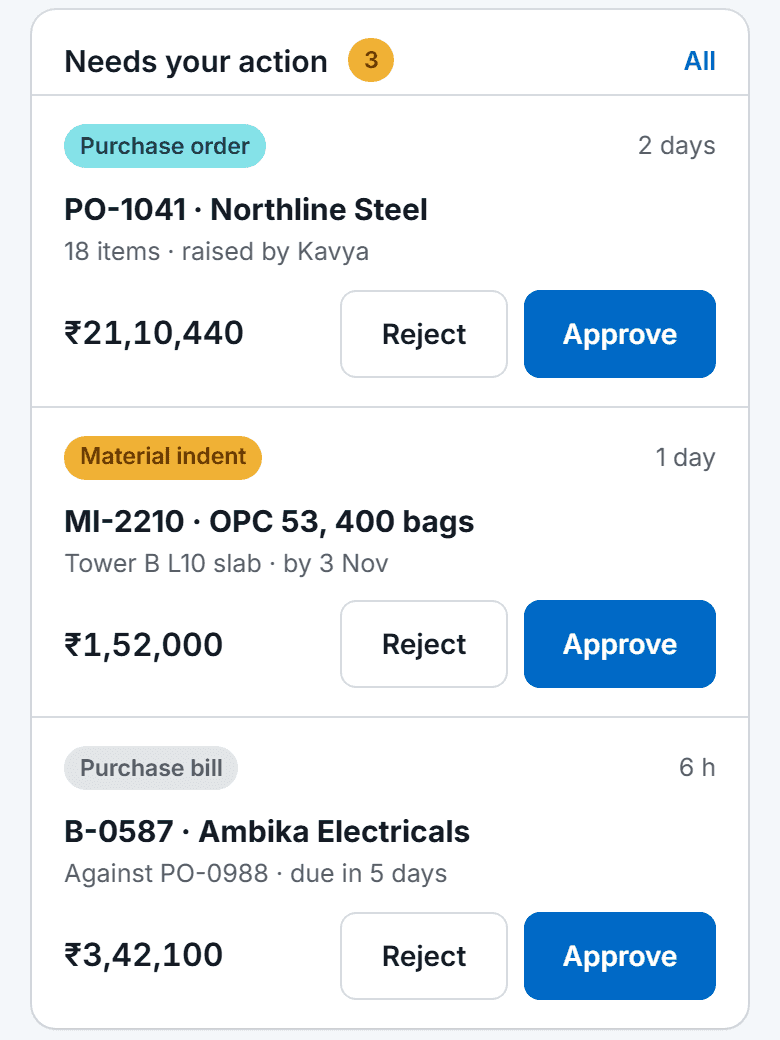
The phone app's Needs your action card with three items and an Approve and a Reject button on each: purchase order PO-1041 for 21,10,440 rupees, material indent MI-2210 for 400 bags of OPC 53 cement, and purchase bill B-0587.

What the platform covers

Five jobs an office does on a project, and the modules that do each. Open a job to see them.

01 · 16 modules

Plan the work

Set the company and each project up once, then plan the work as a schedule the site can update.

  • Import a schedule from Microsoft Project, Primavera or Excel as a template, or assemble one from reusable templates. Construction scheduling
  • The schedule runs on the Critical Path Method, and each approval is saved as a baseline to measure progress against.
  • Tenant settings, roles, calendars, work items and packages come first, then each project with its client, calendar and duration unit.
Every module in this job (16)

Foundation and general

Planning masters

Projects

Schedule

02 · 11 modules

Record the site

Site teams log what happened where it happened, and the office reads the day from it.

Every module in this job (11)

Site monitoring masters

Site operations

03 · 8 modules

Buy material

An indent becomes an order, a delivery and a bill, and every step is on record.

  • An approved indent becomes a purchase order, directly or through RFQs and quotations. Material management
  • Each delivery is checked in at the gate against the order, with three photos.
  • A purchase bill is raised from accepted deliveries only.
Every module in this job (8)

Procurement: material chain

04 · 10 modules

Pay contractors

Work orders, measurements and RA bills stay tied to the BOQ.

  • A work order line takes its contracted rate from a BOQ item. Digital measurement book
  • Approved measurement sheets feed an RA bill line by line. RA bill certification
  • Each bill moves from draft to submitted, approved and paid, with retention and advance applied from the work order.
Every module in this job (10)

Procurement: works contract chain

Billing

05 · 7 modules

Report to management

The daily report and the management reports are generated from the project's own records.

  • The daily progress report for any date, as PDF or Excel. Daily progress report
  • The MIS report as an A4 or A2 PDF, and cash outflow by task and by BOQ item. Cost control
  • A portfolio summary puts every project you can access side by side.
Every module in this job (7)

Reports

Site to office

What the office sees from the site

Site teams log progress, deliveries and issues from the phone app, with photos. The office reads the day from those records instead of chasing calls.

The same records feed the daily progress report and the bills, so what the office signs is what the site logged.

See site reporting

Site feed

Example
  1. 17:15

    Roof slab cast

    Riverside Towers, Tower B

  2. 16:48

    Short delivery flagged at the gate

    Riverside Towers, Store 2

  3. 16:20

    RA bill sent for approval

    Riverside Towers, Package C

The running chains, on screen

The five chains that run a project, each with the screen it lives on.

  1. Procurement: material chain

    From indent to delivery, every step on record. Each step is a record the next one reads.

    • Indent: the site asks for material and the request is approved
    • Purchase order: the order goes to the vendor, from an indent or direct
    • Challan: the delivery is checked in at the gate, with photos
    • Bill: the purchase bill is raised from accepted deliveries
  2. Procurement: works contract chain

    From the schedule to the RA bill. The plan the site works to is the plan the bill is measured against.

    • Schedule: the plan the site works to, with baselines
    • Progress: logged from site against each task, with a photo
    • DPR: the daily report is compiled from those records
    • RA bill: bills built from approved measurements
  3. Billing

    Bills and payments tied back to measurements, so the certified total can be checked against the work order.

    • The project BOQ sets the budget item by item
    • Approved measurement sheets feed the RA bill
    • Recoveries and retention come from the work order
    • Payments and the vendor ledger close each bill
  4. Site operations

    What happened on site today, logged where it happened and read by the office the same day.

    • Task progress with a photo and a location
    • Attendance and labour for the day
    • Issues and snags raised and closed on site
    • The daily report reads all of it
  5. Reports

    The DPR and the management reports, computed from the other modules rather than typed again.

    • The daily progress report for any date, as PDF or Excel
    • The MIS report as an A4 or A2 PDF
    • Cash outflow by task and by BOQ item
    • A portfolio summary across projects
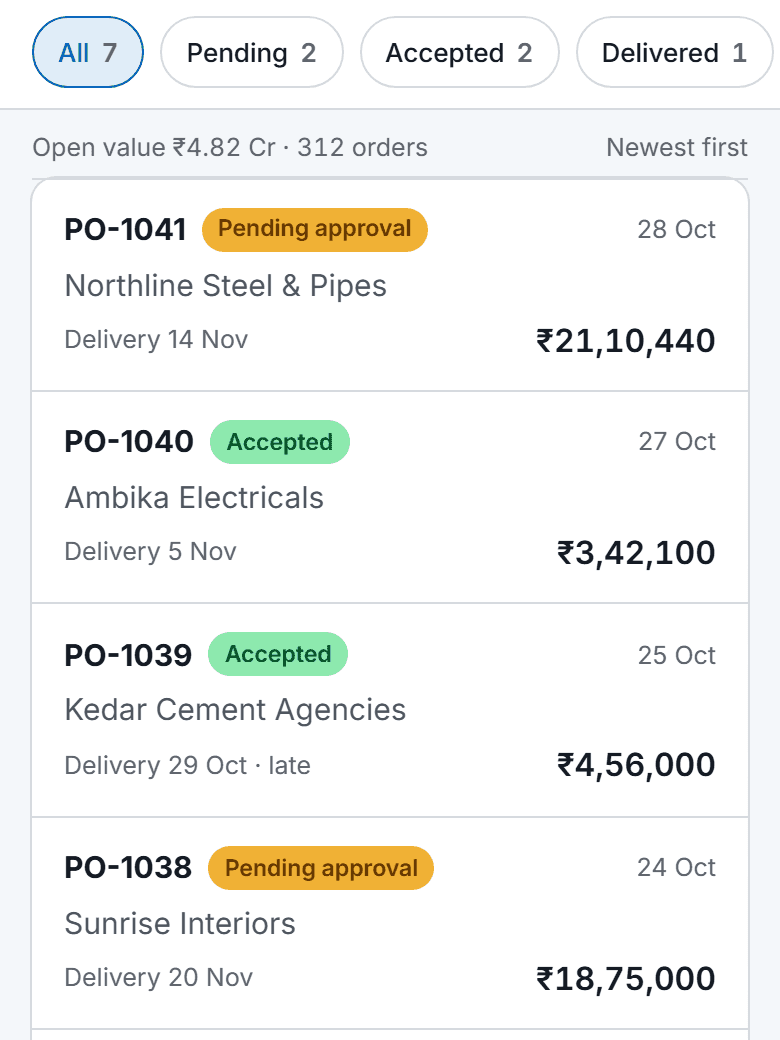
The phone app's purchase orders list: status filters, then order cards for PO-1041 Northline Steel and Pipes pending approval, PO-1040 Ambika Electricals accepted, PO-1039 Kedar Cement Agencies accepted with a late delivery, and PO-1038 pending approval, each with its amount.
Every order with its status, delivery date and amount.
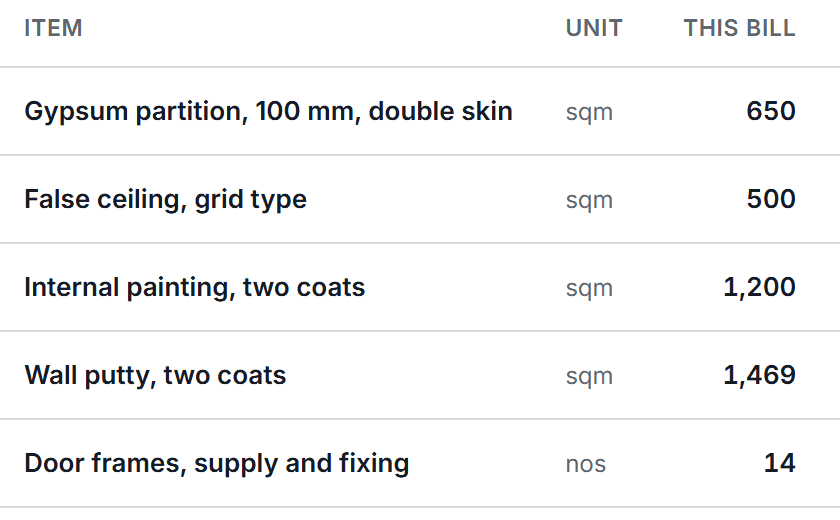
The work order lines of RA bill 07: gypsum partition 650 sqm this bill, false ceiling 500 sqm, internal painting 1,200 sqm, wall putty 1,469 sqm and door frames 14 nos, each in its unit.
Bill lines come from approved measurements, item by item.
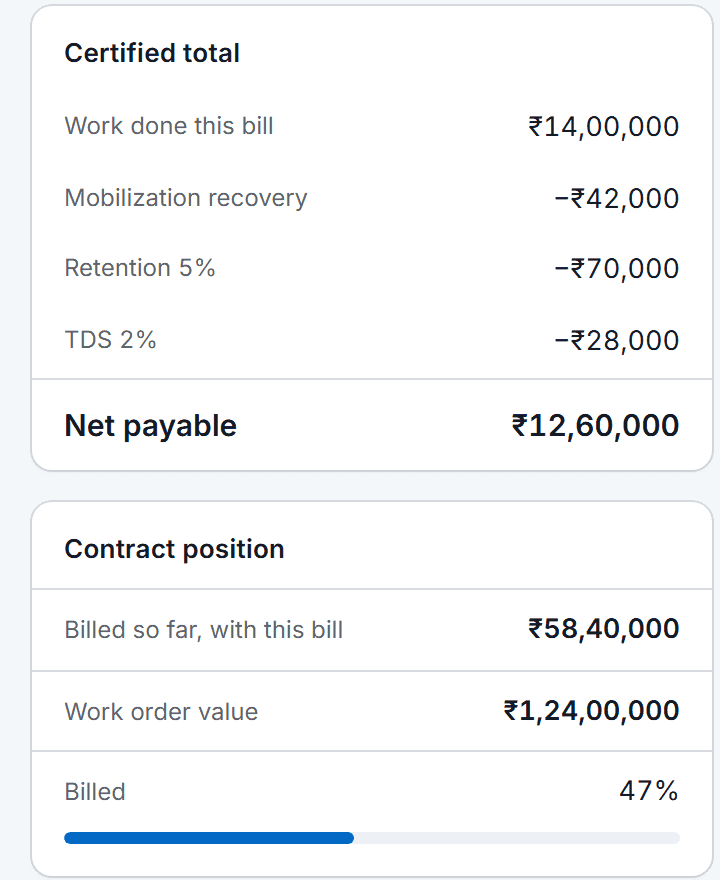
An RA bill's certified total: work done this bill 14,00,000 rupees, less mobilisation recovery, 5 percent retention and TDS, net payable 12,60,000 rupees, and the contract position: 47 percent billed of the work order value.
The certified total, with recoveries, against the work order.
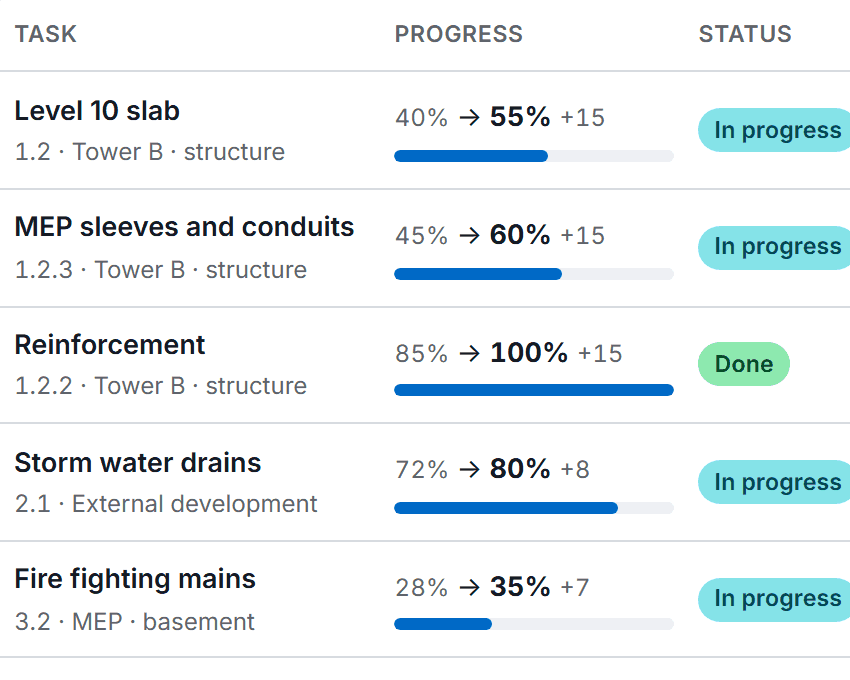
The site reports task progress feed: Level 10 slab from 40 to 55 percent, MEP sleeves and conduits from 45 to 60, Reinforcement from 85 to 100 and Done, each with a progress bar and a status label.
Each update shows the last figure, the new one and the status.
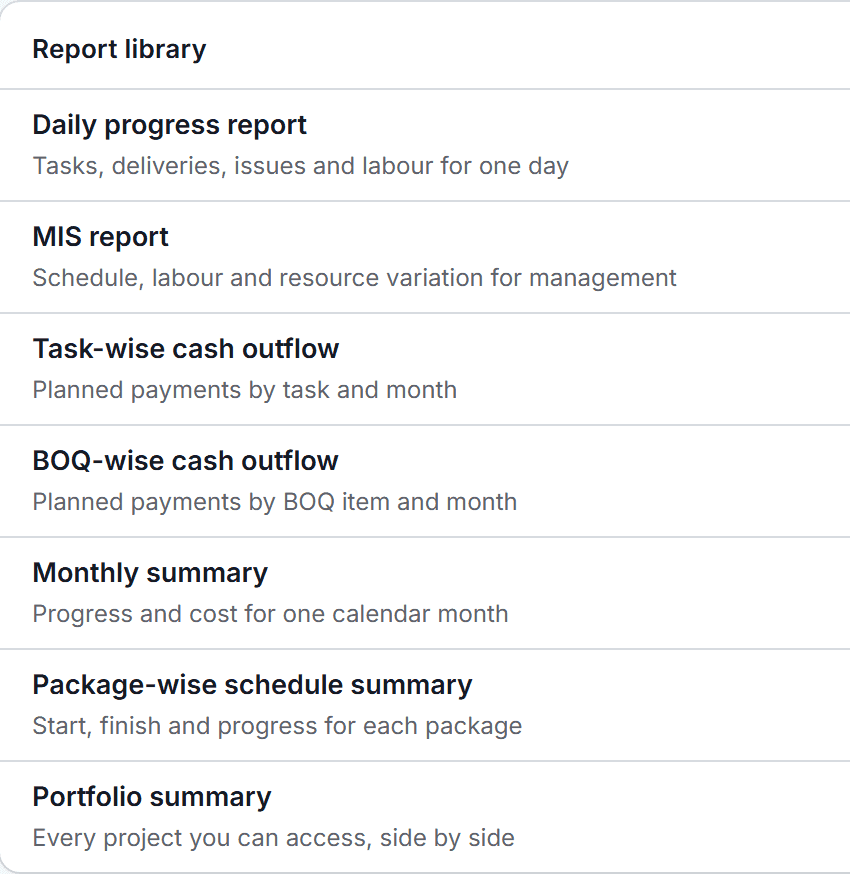
The report library: Daily progress report, MIS report, task-wise cash outflow, BOQ-wise cash outflow, monthly summary, package-wise schedule summary and portfolio summary, each with a line on what it holds.
The report library: seven reports generated from the project's records.

Fits beside your tools, under your permissions

Beside your ERP and planning tools

SuperWise sits between the planning desktop, the accounts package and the site. A planner imports a schedule from Microsoft Project (MPP or XML), Primavera (XER) or Excel as a template. The billing team downloads the BOQ as Excel and generates reports as PDF or Excel.

Work items hold the account references an ERP expects, and a bill can be marked as passed to Tally. Each of these is an import, an export or a reference. A live exchange with another system is documented only for Zapier.

See the integrations

How SuperWise sits beside planning and accounting tools Planning files from Microsoft Project, Primavera and Excel are imported into SuperWise. SuperWise exports the BOQ and reports to Excel and PDF, and marks bills as passed to Tally. ImportExport Planning files Microsoft Project, Primavera, Excel SuperWise One project record Accounts and reports Excel, PDF, Tally mark How SuperWise sits beside planning and accounting tools Planning files from Microsoft Project, Primavera and Excel are imported into SuperWise. SuperWise exports the BOQ and reports to Excel and PDF, and marks bills as passed to Tally. ImportExport Planning files Microsoft Project, Primavera, Excel SuperWise One project record Accounts and reports Excel, PDF, Tally mark

Zapier and the API

The Zapier integration runs on an OAuth2 REST API. A Zap acts only as the user who authorised it, with that user's role permissions.

Triggers fire when a purchase order is created or approved, when a material indent is created, when task progress is logged, when a site issue is opened and when a daily report is submitted. A Zap can create a site issue.

See the integrations

Access and security

Each role holds View, Create, Edit, Delete and Approve privileges per module. Vendor users see only their own organisation's records. Document folders carry their own view, upload and delete permissions, and approval workflows can chain several approvers.

Web and phone

On site and in the office

The same project record is open in the web portal and in the phone app. Office teams work in the web screens for schedules, purchasing, billing and reports.

Site teams use the phone app for material delivery and photos. A tenant can switch on a timestamp watermark for photos taken in the app, and procurement staff get a push notification when a delivery challan is submitted from it.

A worker in a yellow helmet and striped shirt at a shuttering box among rebar on an upper floor, a blue sky and the city skyline behind
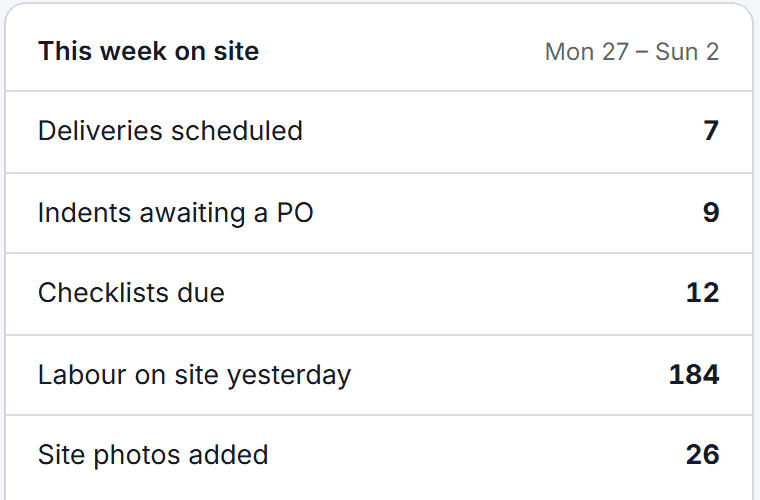
The dashboard card This week on site: seven deliveries scheduled, nine indents awaiting a purchase order, twelve checklists due, 184 labour on site yesterday and 26 site photos added.
What the site did this week, as the office sees it.
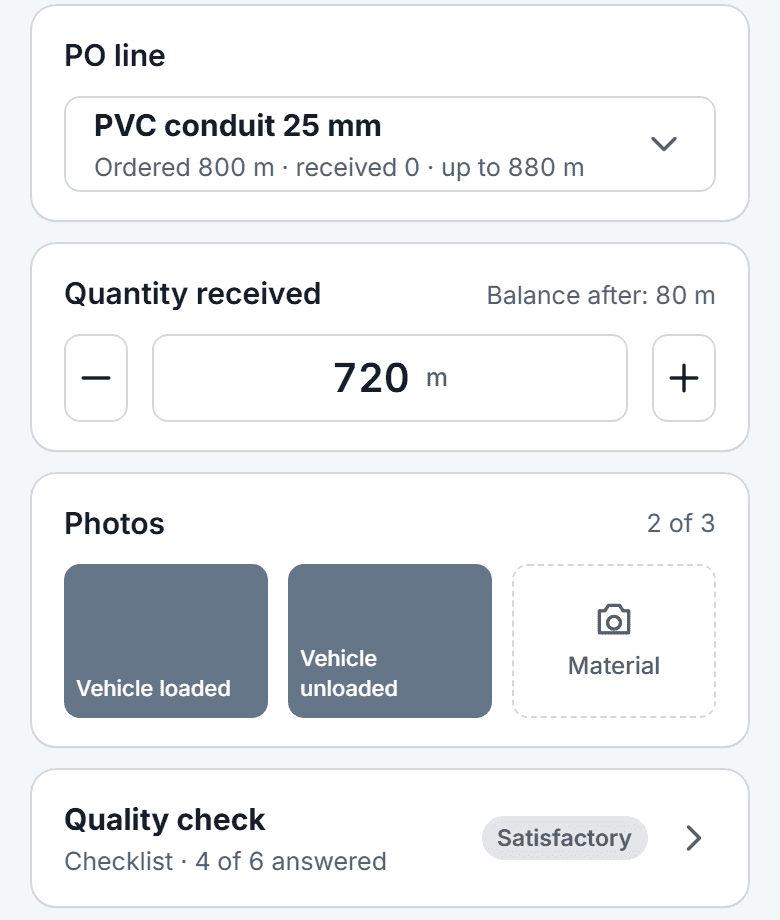
The phone app's Receive material screen for a purchase order line: PVC conduit 25 mm ordered 800 m, 720 m received with a balance of 80 m after, two of three photos taken, and a quality check marked Satisfactory.
Receiving at the gate: quantity against the order, three photos, quality.

Frequently asked questions

What is SuperWise?

SuperWise is construction management software that keeps a project's schedule, site progress, procurement, measurement, billing and documents in one record. Company masters are set up once, and each project runs its own schedule, purchases, site reports and RA bills on top of them, from a web portal or a phone app.

Who uses SuperWise?

SuperWise is used by contractors, developers and project management consultants. The customers named on this site include real estate developers, general civil contractors, an event infrastructure contractor and a government infrastructure contractor, and SuperWise has run live projects for over a decade.

Does SuperWise work beside Microsoft Project and our accounts software?

Yes. SuperWise imports a schedule from a Microsoft Project file, a Primavera XER file or an Excel sheet as a template, exports the BOQ to Excel and reports to PDF or Excel, and lets a bill be marked as passed to Tally. These are file imports and exports and a mark on the bill. A live link exists only through Zapier.

How does a rollout start?

A rollout starts with tenant settings, then the company masters, then the first project. Tenant settings come first because they change how the whole application behaves. Masters such as users, vendors, resources and templates follow, and each project is created with a name, code, location, client, calendar and duration unit.

Is there a mobile app?

Yes. Site teams use a phone app next to the web portal, for example to submit material deliveries with photos. A tenant can add a timestamp watermark to photos taken in the app, and procurement staff receive a push notification when a delivery challan is submitted from it.

Can other tools connect to SuperWise?

Yes, through Zapier. The integration uses an OAuth2 REST API and acts only as the user who authorised it. Triggers cover purchase orders, material indents, task progress, site issues and daily reports, and a Zap can create a site issue. Everything else is an import or an export.

See the platform on your own project

Book a demo and we walk through your site data.

Book a demo