The problem most teams are still living with

Start with structure

Even a manual template works better when teams know exactly what must be captured every day.

Avoid the usual mistakes

Missing activity details, vague issue notes, and absent proof make daily reports weak and hard to trust.

Know when to upgrade

Templates help early, but software becomes more useful once updates need to feed management, billing, or MIS workflows.

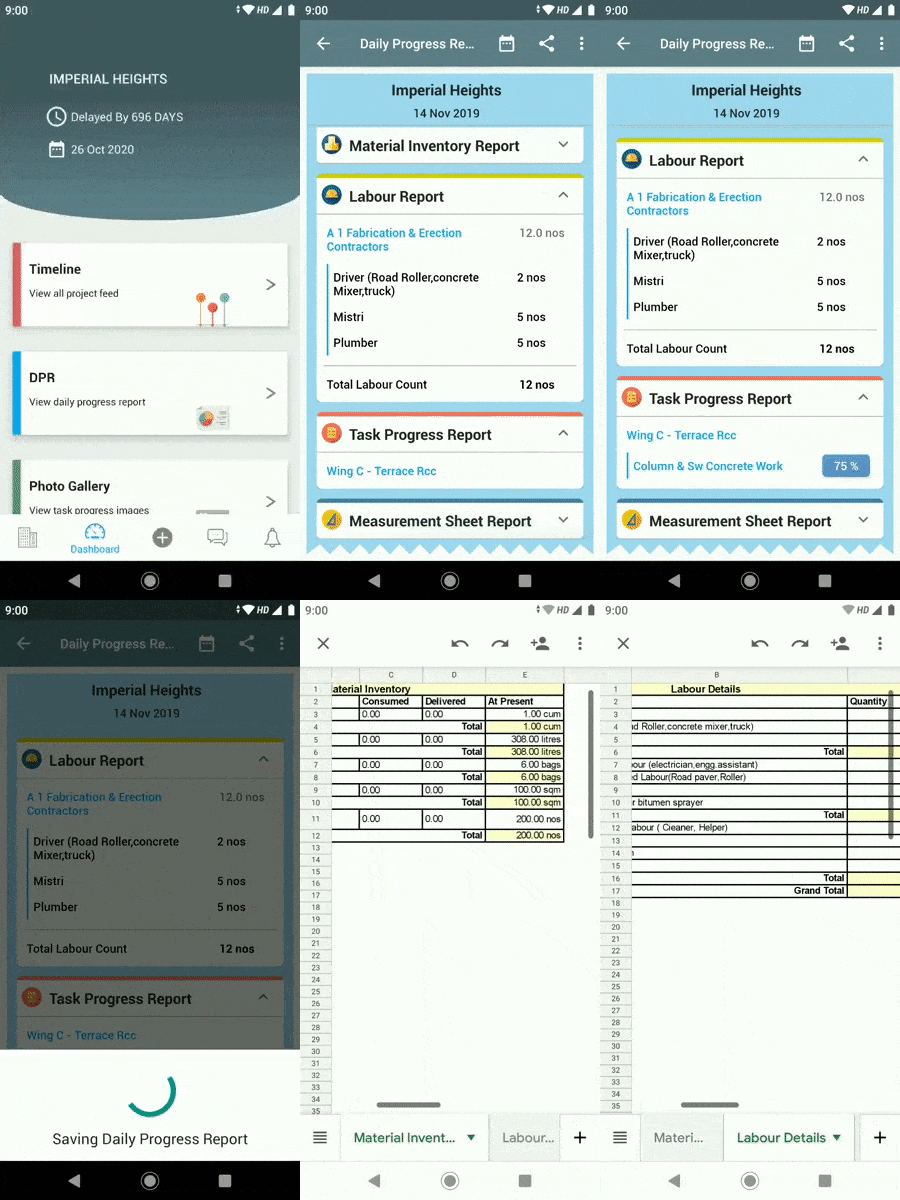
Construction daily report template showing activity progress labor and material fields

What a construction daily report template should capture

A practical DPR template should capture work done, manpower, material events, key issues, hindrances, and evidence for the day.

It should also make it easy for the reviewer to understand what needs action and what may affect schedule or cost.

  • Date, project, and location details
  • Activities completed and current progress
  • Labor and material summary
  • Issues, delays, and supporting notes
Construction reporting upgrade from manual DPR template to software-led workflow

Why manual templates eventually hit a ceiling

Templates are useful for standardization, but they still rely on site teams rewriting information and management teams trusting that the summary is complete.

Once projects need more evidence, faster sharing, and tighter downstream reporting, a DPR app usually becomes the better operating model.

Construction reporting pack showing DPR template to software workflow path

When a DPR template is the right start — and when software becomes better

A template is the right place to start if your team needs to standardize what gets reported each day. It creates a shared structure, reduces variation, and makes reports easier to review.

But templates have limits. Once reports need to be verified, shared quickly, or connected to billing and MIS, a structured software workflow becomes more reliable than a filled spreadsheet.

  • Standardize the daily report format first
  • Review where manual reporting creates delay
  • Move toward evidence-backed reporting next
  • Connect DPR data to billing and management workflows

70+

Projects

500+

Active Users

3500+

Purchase Orders

20000+

Material Deliveries

Frequently Asked Questions

Is a daily report template enough for every project?

No. It is a good starting point, but software becomes more useful when reports need cleaner evidence, faster sharing, and stronger downstream reporting links.

Can teams use a manual DPR template and SuperWise at the same time?

Yes. Some teams start by standardizing the template format with SuperWise while senior staff still compile the final daily summary manually. Most transition to full software reporting once the field team is comfortable with the mobile workflow.

How detailed should a daily report template be?

Detailed enough to cover work done, manpower deployed, materials received, key issues, and a photo reference for the day. Too many fields create friction and teams stop filling them. Too few and the report is not useful for billing or dispute support.

Explore Related Pages

Daily Progress Report App

Automate DPR with geo-tagged evidence and same-day stakeholder sharing

Construction Site Reporting Software

Full site reporting workflow covering progress, issues, and materials

Construction Reporting Pack for India

DPR, MIS, delay log, and billing formats for India construction teams

Use the right format today and plan the right workflow next

Request a sample if you want to standardize DPRs now and see how a software workflow can improve them later.

Are you ready to SuperWise?

Take a demo or signup now to experience an empowering construction project management solution.

Request a demoSignup Now!